
Designing AI Behavior at Scale: Building Conversational Patterns for 1.6M Walmart Associates
80,000 weekly active users
across enterprise search and workflows
40% reduction in
scoped call center query categories
3 platforms integrated
Walmart One, Me@Campus, and Store App
Squiggly needed to support radically different kinds of work, from finding a coworker to navigating a career decision to resolving a sensitive employee workflow, through one conversational surface. My work defined how that surface should behave: what changes when the system is confident versus uncertain, and what patterns other teams could build on as the platform scaled.
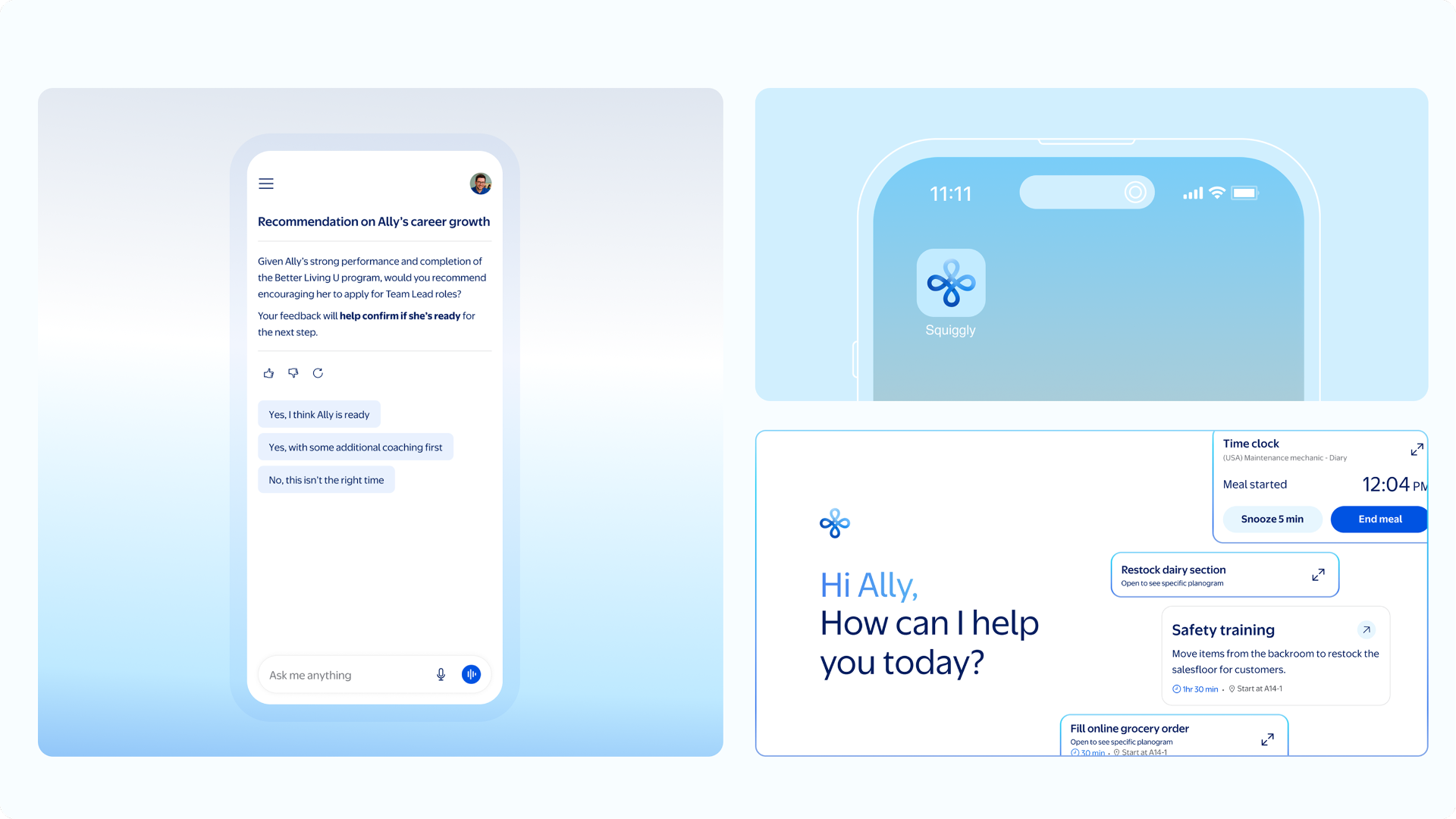
One conversation. Many kinds of work.
Store associates relied heavily on mobile devices throughout the day; Home Office associates worked across an entirely different set of enterprise tools. In both environments, people had to know where information lived, which system owned the next step, and how to move between them.
Squiggly created an opportunity to bring that work together: one conversational experience that could understand what someone was trying to accomplish, surface the right information, and guide them through the actions required to complete it, instead of routing them tool to tool.
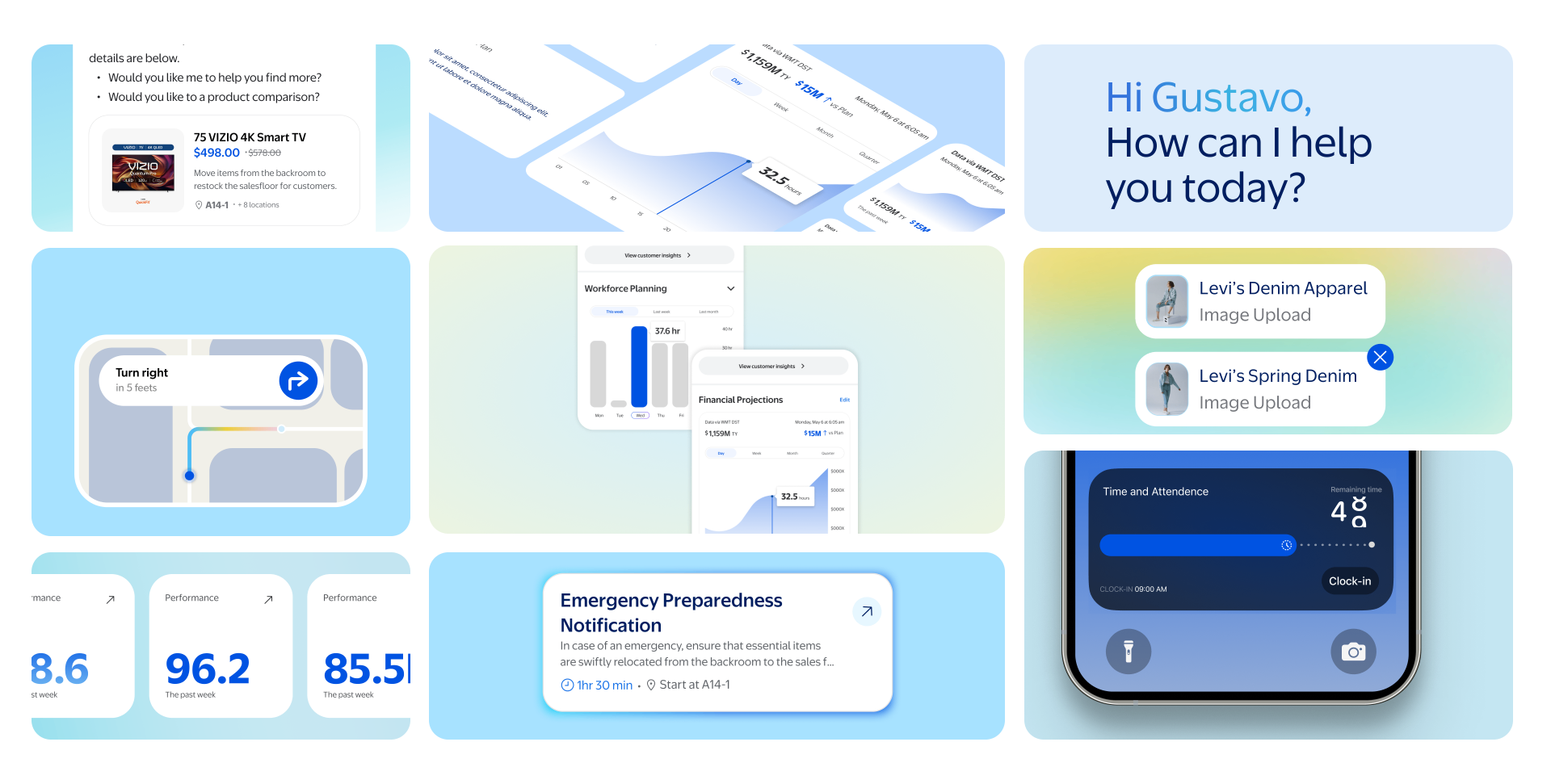
The Challenge
Confidence had to shape the interface, not just the copy The system's certainty about who someone was and what they needed varied constantly. A single fixed conversational pattern couldn't hold: the interface itself needed different states for high-confidence, direct answers versus low-confidence, clarifying ones.
Components had to work across wildly different scenarios The same profile, avatar, and result patterns had to represent a single confirmed match, several possible matches, a manager-and-associate collaboration, and a multi-system action, without becoming four different design languages.
Sensitive workflows couldn't be automated awaySome scenarios, like attendance exceptions, involved private context and a real decision that had to stay with a human. Design here meant knowing where AI should surface and clarify, and where it needed to step back.
Patterns needed to scale beyond any one workflow Individual scenarios were only valuable if they revealed something reusable. My job wasn't to ship one good workflow. It was to find what generalized, and get the design system built around it.
"My biggest takeaway: meet the user where they are, at the right time, when AI actually makes sense."
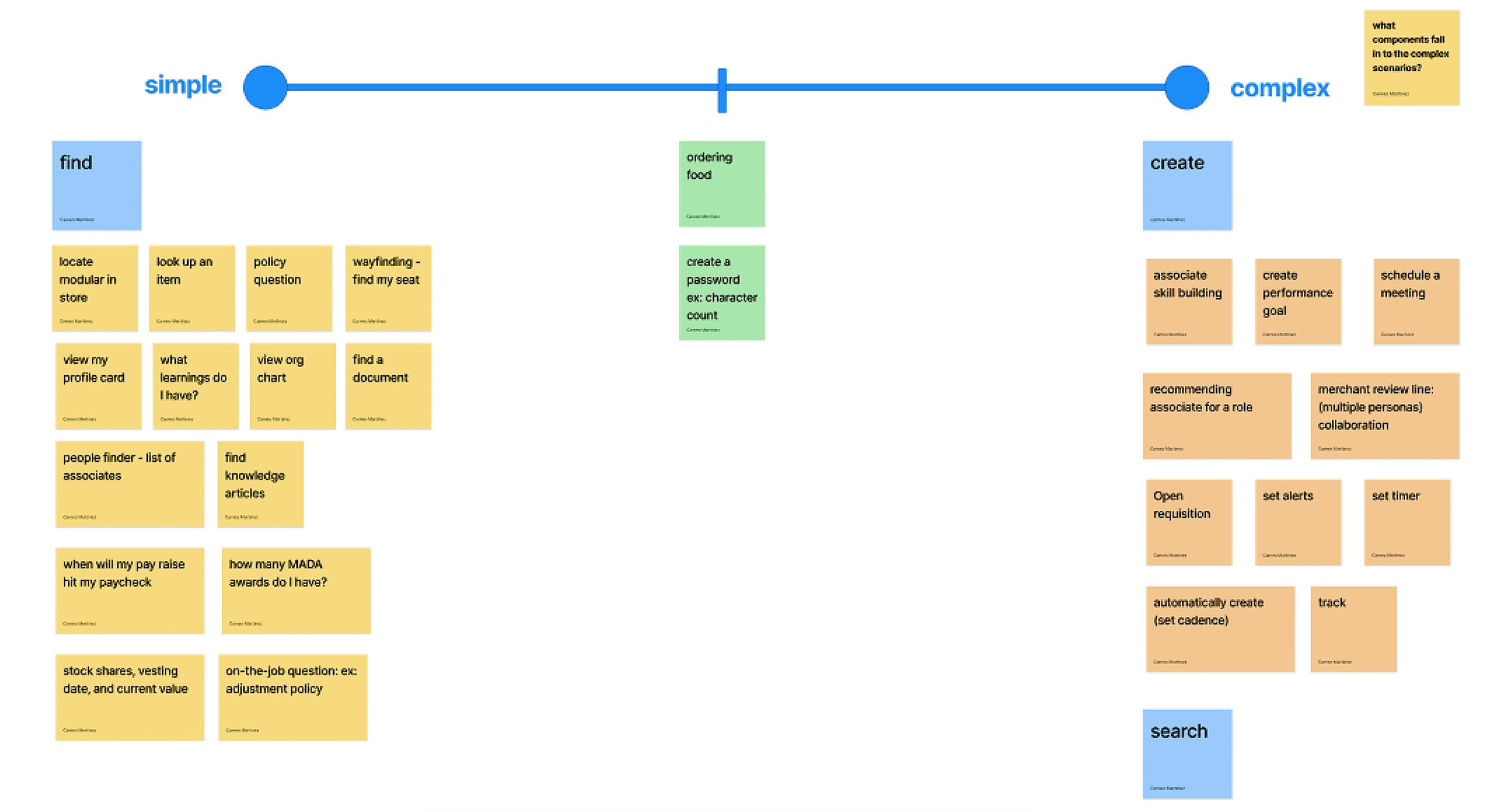
Mapping the work from simple to complex
Before designing individual workflows, I mapped associate needs across a spectrum from simple requests to complex, multistep goals. Some needs could be resolved with a direct answer. Others required personalization, collaboration, several decisions, or coordination across systems.
The spectrum made the breadth of the platform visible and helped the team choose scenarios that would test different levels of complexity.
What this unlocked
The landscape helped leadership identify practical starting points while keeping the larger platform vision in view.
It also gave design and product a shared way to discuss where the AI could respond directly and where it needed more context, guidance, or orchestration.
Pressure testing the experience
I explored scenarios across different roles, goals, and levels of complexity to understand how Squiggly needed to behave. Each one helped turn a broad platform idea into a more specific product decision.
Finding an Associate
How should confidence shape the experience?
Confidence depended on the amount and quality of data available to personalize the result.
When the system had enough reliable context to identify one person, Squiggly could provide a direct and personalized response. When the data pointed to several possible matches, the experience needed to clarify the request and narrow the options.
The lower-confidence path allowed the associate to continue refining the search without starting over.
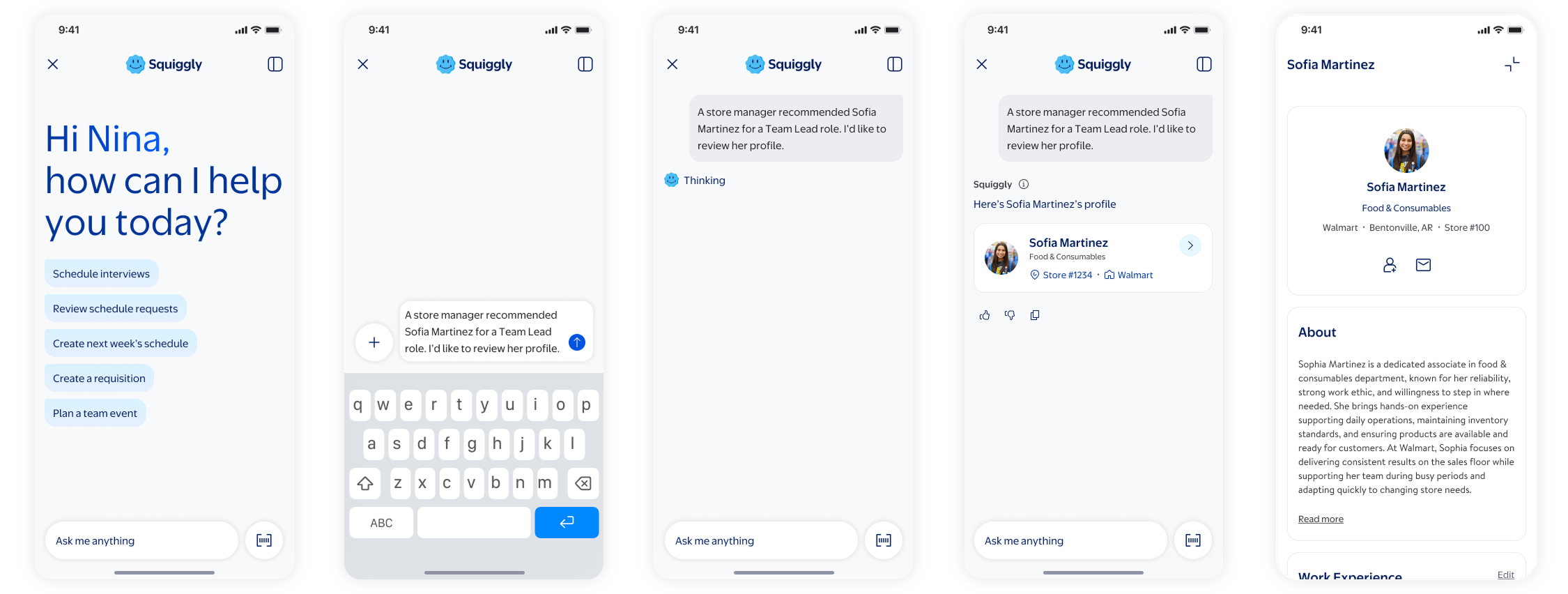
High confidence UI workflow
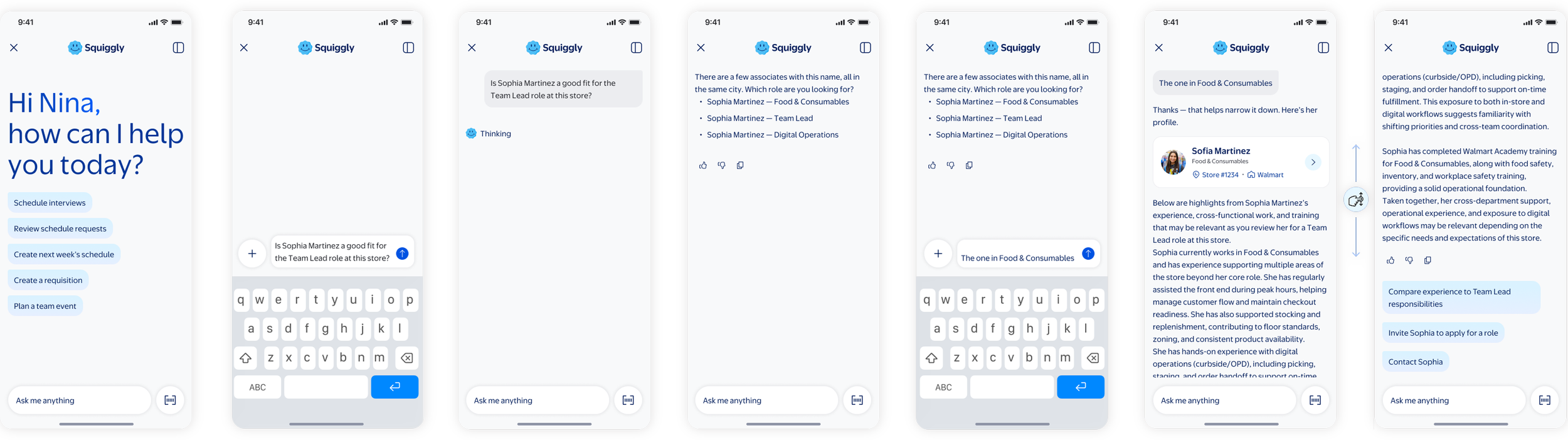
Low confidence UI workflow
Design decision unlocked
This scenario helped define how data, personalization, and confidence worked together. It influenced clarification, result presentation, and recovery patterns.
Managing Attendance Exceptions
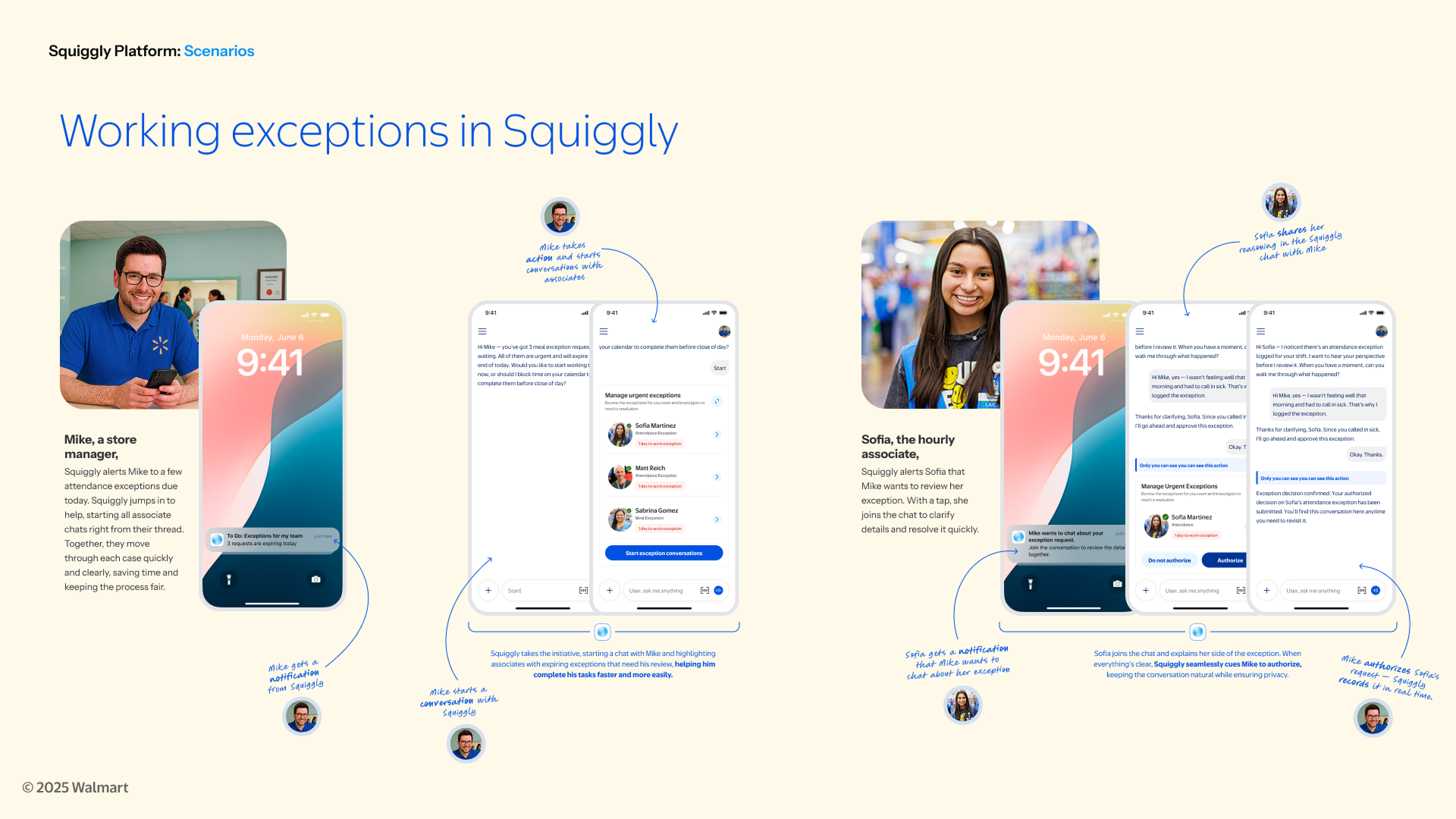
How should AI support a sensitive, collaborative workflow?
This scenario involved a manager, an hourly associate, private context, shared visibility, and a final decision.
Squiggly could surface the exception, invite the associate to provide context, and keep the final action with the manager. The experience needed to support collaboration without automating a sensitive employee decision.
What this unlocked
The workflow pressure-tested privacy, participant visibility, profile context, and actions within the conversation. It also identified notifications as an area that needed further UI exploration.
More Workflows Explored
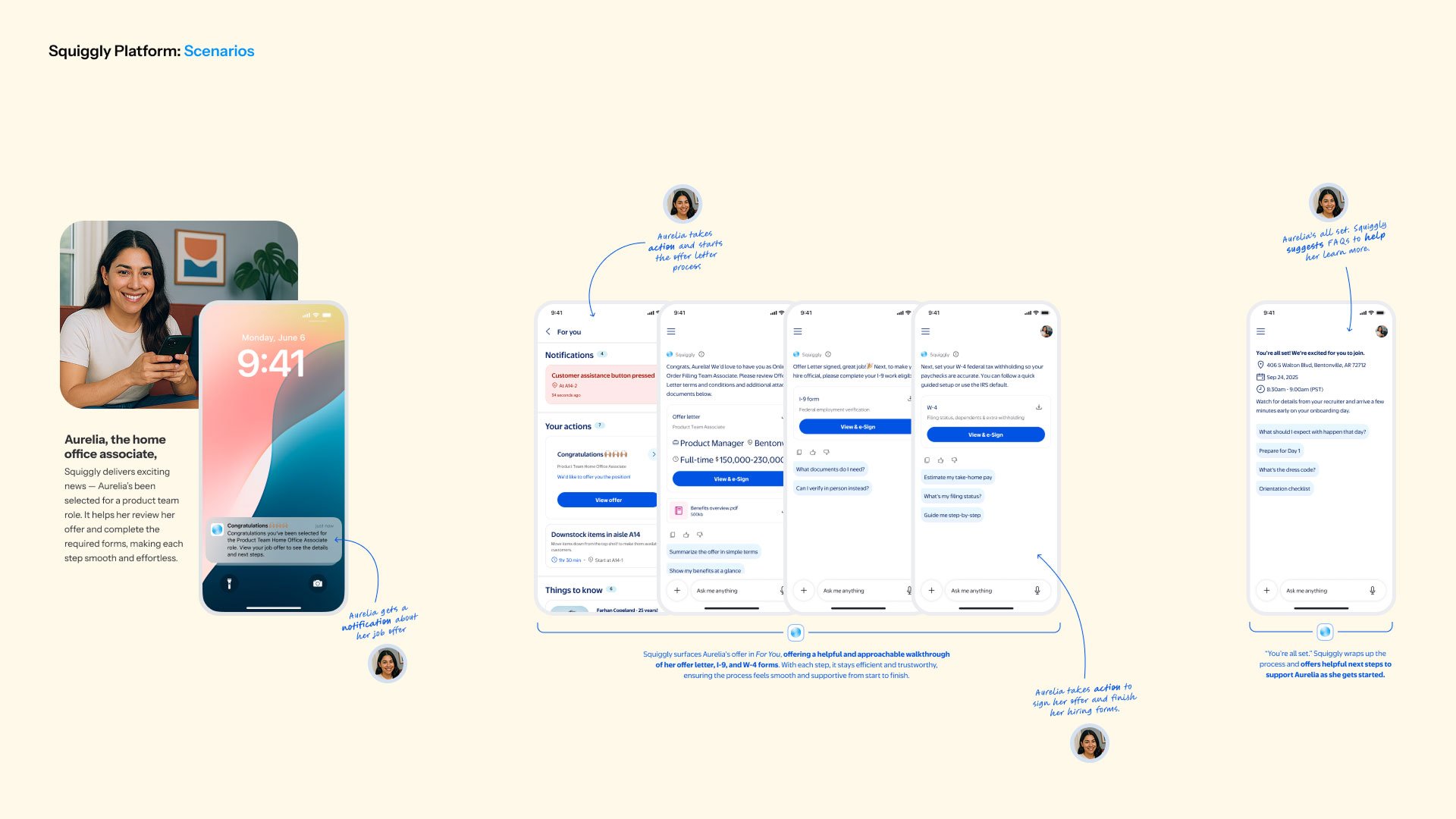
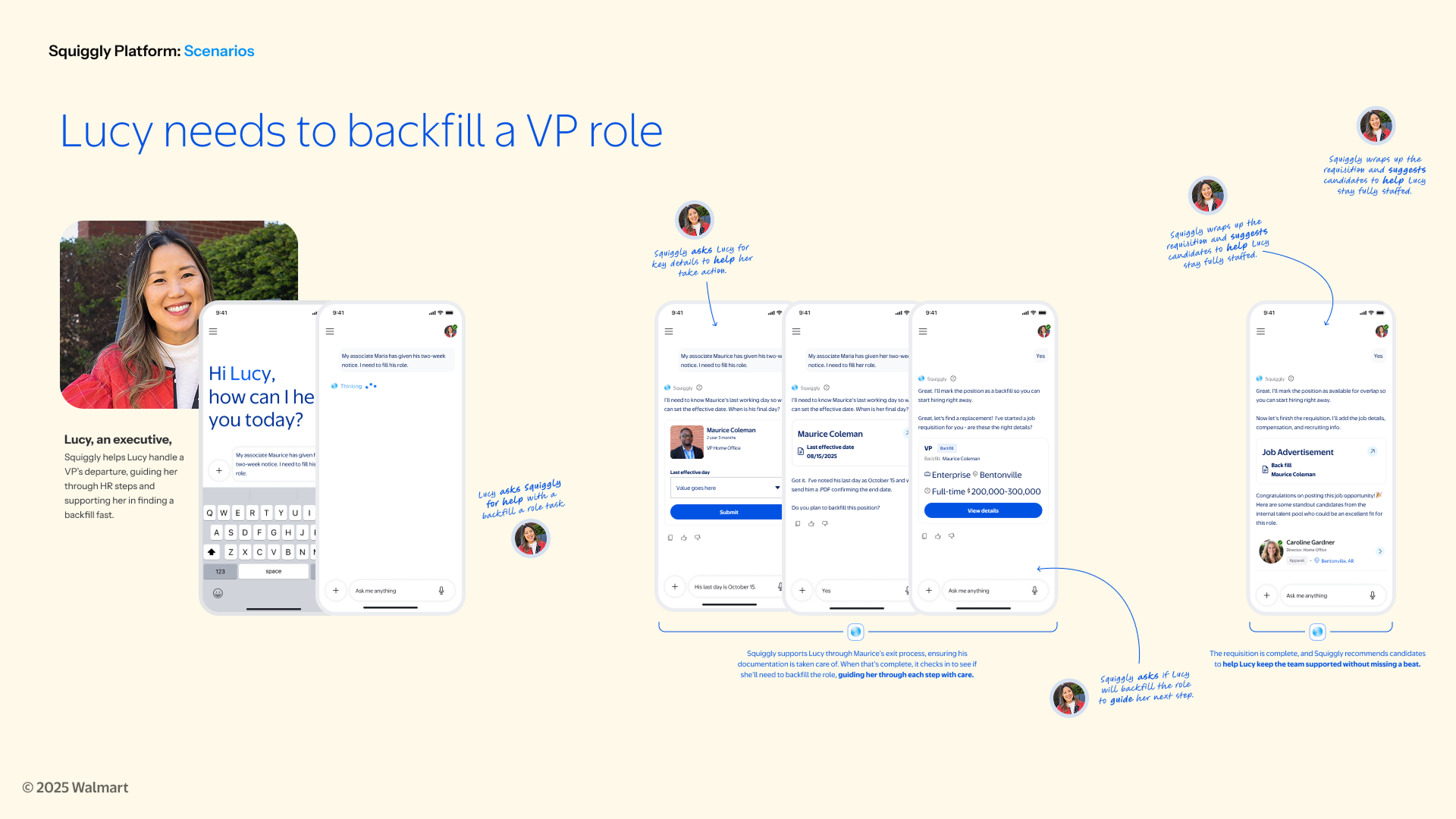
The scenario work also included accepting an internal offer and backfilling a leadership role.
Together, these examples tested confirmation, transparency, recommendations, profile context, long-running workflows, and actions spanning multiple systems.
Patterns That Emerged
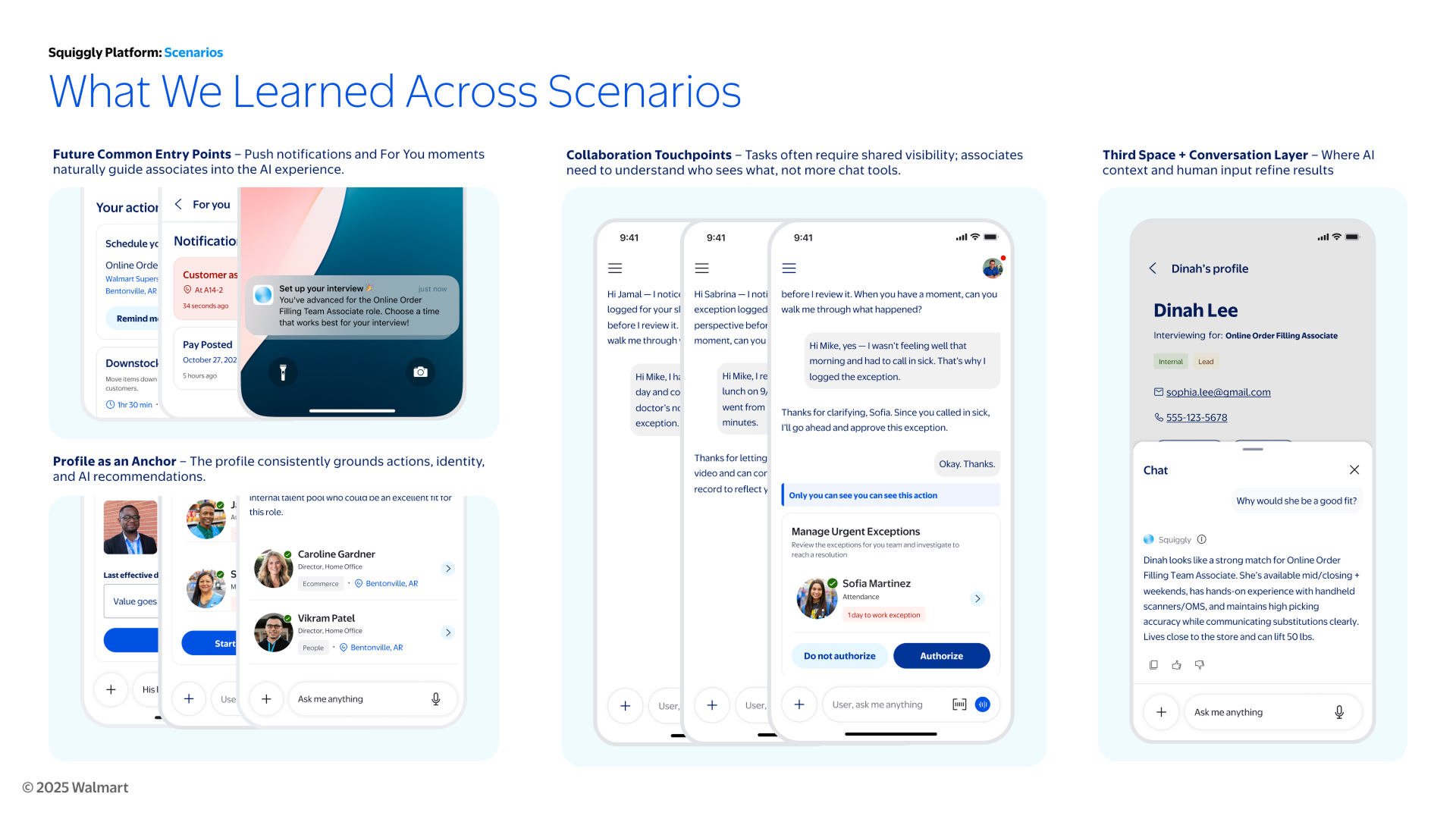
Looking across the scenarios revealed patterns that were larger than any one workflow.
Proactive entry points
Notifications and personalized moments could bring associates into Squiggly when attention or action was needed. The experience did not always need to begin with an empty chat box.
Profiles as anchors
Identity, role, permissions, and employee context helped ground recommendations and actions. Profiles also gave the system more context for personalization and confidence.
Shared visibility
Collaborative workflows required clear signals about who could see information, participate in the conversation, and take action.
AI within the workflow
Conversation did not always need to replace the full product experience. In some cases, AI was more useful as a layer within a task, profile, or existing interface.
Confidence shaped by data
The amount and reliability of available data influenced how confidently Squiggly could personalize a response, recommend a next step, or complete an action.
When confidence was lower, the experience needed to clarify, narrow the options, or provide another path.
From patterns to scalable components
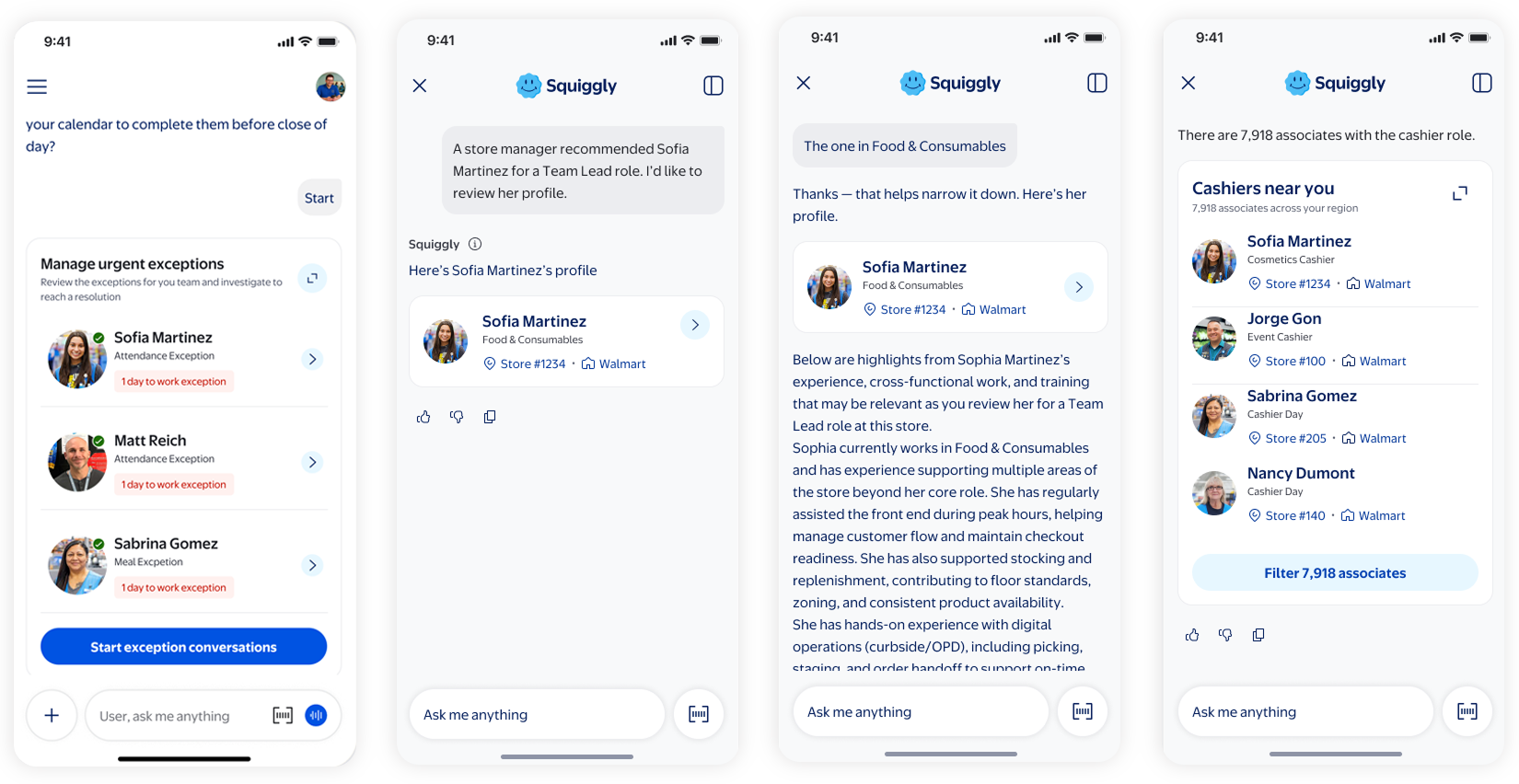
The scenarios helped reveal where the interface needed to adapt across different workflows.
The avatar and profile patterns became a particular focus. They needed to do more than identify a person. Depending on the scenario, they also communicated role, participation, ownership, recommendations, or shared context.
I shared these design explorations with the designers refining the components in the design system. This gave them additional contexts and states to consider as the patterns evolved.
What changed
The work clarified where existing components could scale, where additional states were needed, and where further UI exploration was required.
What the work enabled
The scenario work helped move the team from a broad platform vision to clearer product and interaction decisions.
It helped product, engineering, and design:
define how AI should personalize, guide, clarify, coordinate, and recover
connect confidence to the amount and reliability of available data
pressure-test interface components across simple and complex workflows
identify where patterns could scale and where new states were needed
surface quick wins that helped leadership prioritize near-term opportunities
align future platform capabilities with real associate goals
The work created a stronger foundation for AI-assisted experiences that could grow across Walmart’s associate ecosystem.
Reflection
Designing AI behavior starts with context
This work reinforced that conversational AI design is not only about what the system says.
It is about what the system knows, how confident it can be, what action makes sense, and how it helps someone move forward when the ideal path is not available.
Starting with scenarios helped me turn ambiguity into product decisions and translate complex workflows into behaviors and patterns the broader team could use.